Getting Over Why Writing Is Hard & Nike: Just Do It!

I have always thought about being a writer. As a kid, I wrote a poem when President John Kennedy was shot and still have it in my scrap book.


I saw myself as a writer but certainly didn’t know how to be one. As a kid, I just wrote. As an adult, I think about writing and then think about the reasons why I can’t.

That’s what has happened with my writing on and off. I did it, and then I didn’t. Why? I have theories: 1) No time due to my time spent on my job as a writing teacher; 2) Can't take time away from family;  3) No topics of interest  ; and, TRUTH: 4) Not good enough. Reasons 1-3 were smoke screens for the heart of the matter: I thought I wasn’t good at it.  

Notice the theme here: no, can't, not, nothing. This is all negative. STOP NEGATIVITY. The path to being a writer or anything else is simple:


In fact, in the case of writing, just do it and do it and do it, over and over and over, reading it out loud, until you hear that it’s good, and you think, “Wow, I kind of like this.”

Then ask someone to read it and LISTEN to what he or she thinks about what you’ve written.  Be ok with what someone tells you about your writing. When you’re in school, college, or a job, someone is going to read whatever you write. Get used to it. Be strong. What’s the worst thing that can happen? Someone suggests something to help you make your writing better. Wouldn’t that be great?

Decide to write first when you get up, before social media, emails, work, kids, even if for only 5-10 minutes. Why? Because you won’t write at all if you don’t do it. You’ll have nothing to share if you don’t do it. Finally, you will fail in your classes, work, and being a role model to people you care about, if you don’t do it.

Because getting over writing is hard, take this writing rescue tip: NIKE: JUST DO IT.


Watching Instructional Videos

“Of course, instructional videos will help me improve my learning,” you say. “Really, I ask?” I ask this because, until recently, I never watched instructional videos. I always thought, “I know how to do this.” However, that was not the case. I would spend hours trying to figure out how to do something that I could have learned in three minutes of watching a “How to” video. Stubborn: that’s what I am. Confess: You do this too!!!!!

Now I watch instructional videos. For example, as an online writing professor, I must figure out how to use the learning management system for teaching, BlackBoard (BB), just as do you! Typically, there are videos or written instructions on how to do anything in BB, on the course home page or in the Student Center.

Professors also send out announcements found in the BB course shell or by email, containing instructional and walk-through videos showing how to understand course technology and assignments. Instructional videos are also easily found by typing "how to" topics into YouTube such as "How to submit an assignment in BlackBoard” or "How to Enter an Online English Classroom." Putting a topic into Google is also another way to find a "how to" video. 

Guess what? Instructional videos are there for just what they state: To instruct you to do well in whatever you are trying to accomplish. Watch them. Learn from them. Do not waste time figuring out or avoiding learning something because you don't watch instructional videos. Not watching instructional videos wastes your precious time, and you and I both know that our time is limited. 


Creating a Thesis Statement

The thesis statement in a piece of writing is typically the last sentence in the introduction. Its purpose is to give readers the topic, claim, and reasons for the writing, guiding the reader's journey throughout the text.


Using an APA Template

Download this Microsoft Office APA template and put it in a file folder named "APA" on your computer. Any time you need to write an APA paper, just open up the document, put in your own information, and never worry about the formatting again.


Making APA Headers

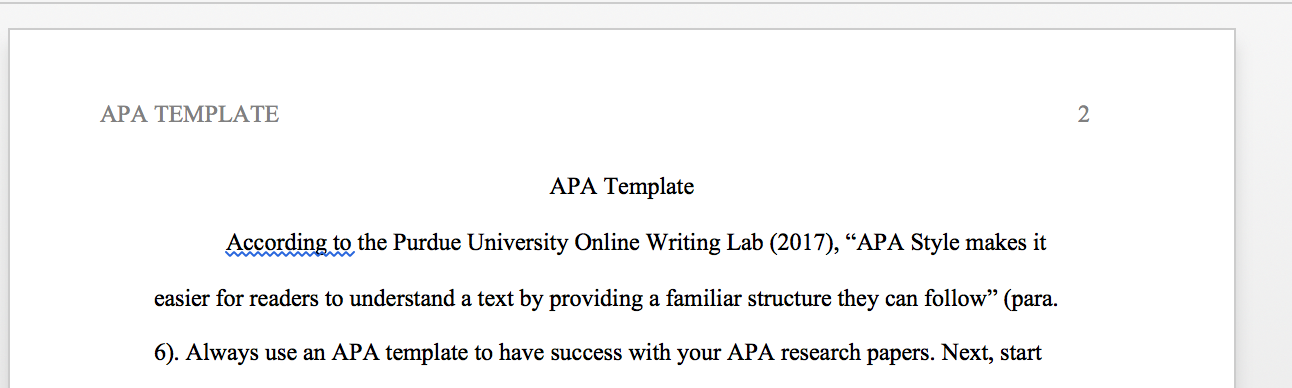
Every APA paper has headers on all of its pages. The first page is the only unusual header; all the other headers are the same except for the page number. Look at the attached handout to see how to create APA headers.


Formatting APA Line Double Spacing & No Extra Spacing

APA style requires only 2 lines of spacing between paragraphs. View this document to learn how to set Microsoft Word to 2 line spacing between paragraphs.


Starting Every Page in APA on the First Line Below the Header

In APA format, except for the cover page, start every page on the first line below the header. On page 2, center your title on the first line, capitalizing the first letter of major words. For your References page,  center the word References on the first line of the last page of your APA paper.